
I keep seeing tutorials promising to get AI running your marketing in ten steps. Usually, by step four, you’ve connected your inbox. By step seven, something is sending emails. I have several questions about steps five and six.
I build AI growth systems for founders. There is a lot you can take off someone’s plate: researching prospects, preparing content, checking pages, drafting follow-ups and keeping track of what needs attention.
But the useful part is the whole process working. A good draft is lovely. A draft based on the wrong prospect, an outdated offer and a follow-up that already happened is considerably less lovely.
If you watched my Reel, these are the five steps with the missing detail filled in. You can use this to scope a first build, brief someone helping you, or interrogate the system you’ve already started.
We’ll use a small prospect-research workflow as the example. It’s an illustrative setup, not a promise about results or a description of every client’s system.
1. Pick a job you can actually judge
“Run my growth” leaves an enormous amount open to interpretation. Even “do acquisition” contains research, qualification, contact sourcing, messaging, follow-up and relationship management.
Start with a job small enough that you can recognise a good result without spending an afternoon investigating it.
For our example:
Each weekday, prepare up to five potential prospects for review. Include evidence of fit, a current reason to talk and any uncertainty. Do not contact anyone.
“Up to” matters. If only two companies meet the criteria, I want two companies and an explanation. I do not want three consolation prizes.
Before building, answer four questions:
Does this work recur often enough to justify maintaining a system?
Can I explain how I currently make the decision?
Can I check the output against evidence?
Can I contain the damage if it gets something wrong?
If the answer to the last two is no, narrow the task. Drafting for review is a different starting point from sending.
You also need a baseline. Time yourself doing a few examples manually. Record how long research and checking take, what information you need and what makes you reject a candidate. You’ll use that later to work out whether the automation has helped.
If acquisition isn’t your bottleneck, choose another starting job:
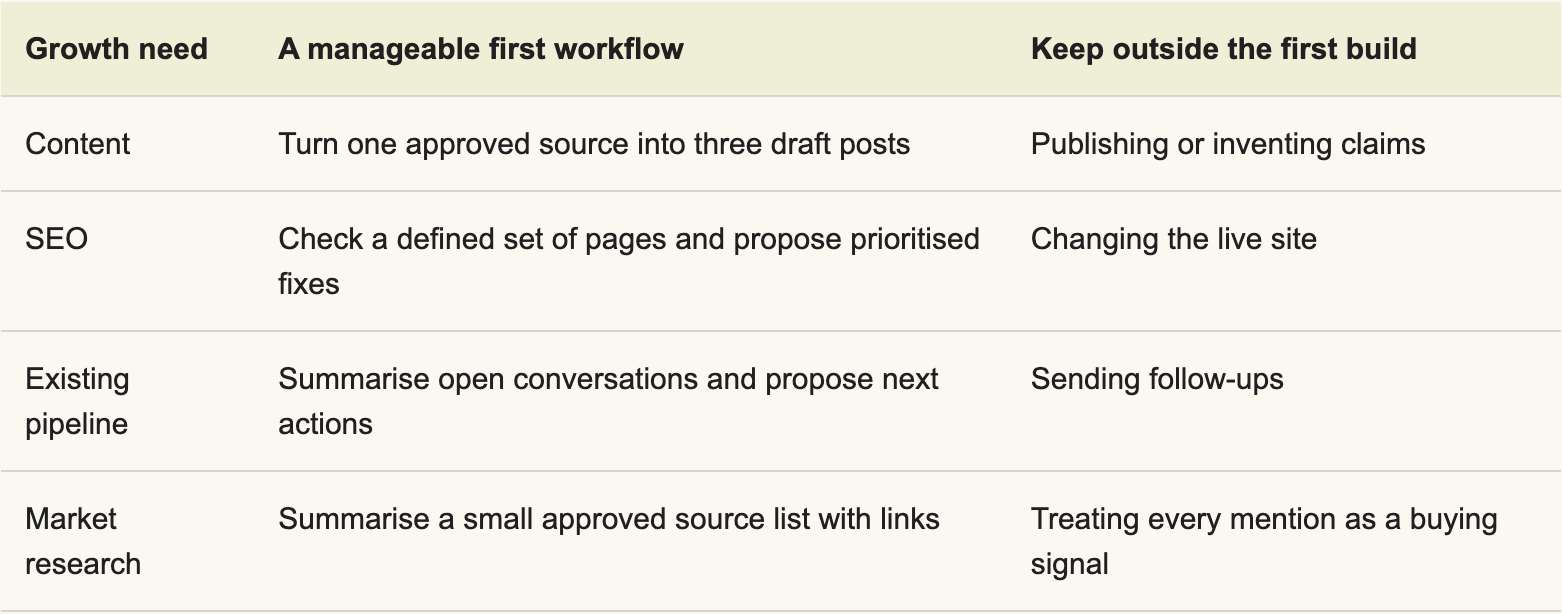
These are starting scopes, not universal channel recommendations. If your customers come through local reputation, a beautifully automated global prospect list probably isn’t your next priority.
Leave this step with: one recurring job, a defined output and a record of how you do it today.
2. Give it the decisions behind the instructions
“Find relevant companies” is how you get a long list that somehow contains nobody you want to talk to.
Write down what relevance means in your business. Include what you sell, who benefits, what makes a company unsuitable and what would make you contact them now rather than six months ago.
Then add examples. An accepted prospect with your reasoning is useful. A superficially attractive prospect you rejected can be even more useful.
For a fictional service helping small B2B software companies improve onboarding:
Good fit: a company with a self-serve trial and a documented onboarding problem your service addresses.
Poor fit: a company that matches the industry but sells only through lengthy enterprise procurement, outside your service’s scope.
Not enough information: a company with a vague growth announcement and no evidence of the relevant problem.
Notice the third option. The system needs somewhere to put uncertainty without turning it into a yes.
Here’s a brief you can copy:
Job: What recurring work should be completed?
>
Business context: What do we sell, to whom, and why do they buy?
>
Inclusion criteria: What must be true?
>
Exclusions: Who or what should never enter this workflow?
>
Evidence: Which sources are acceptable? How recent must information be?
>
Examples: Three accepted and three rejected outputs, each with a reason.
>
Output: Which fields must be returned?
>
Missing information: What should happen when evidence is unavailable or contradictory?
>
Limits: Which actions are outside scope?
>
Owner: Who reviews the work and maintains these instructions?
For the prospect workflow, I’d ask for company name, website, evidence URL, source date, reason for fit, reason to talk now, uncertainty and proposed next step. A contact should come with a source too. A plausible-looking email address is not a verified email address.
You can ask AI to interview you and draft this brief. Read it carefully afterwards. A polished document can hide assumptions you never made.
Leave this step with: a short operating brief and labelled examples that explain your judgment.
3. Map the process before you connect the accounts
Now decide how the work moves.
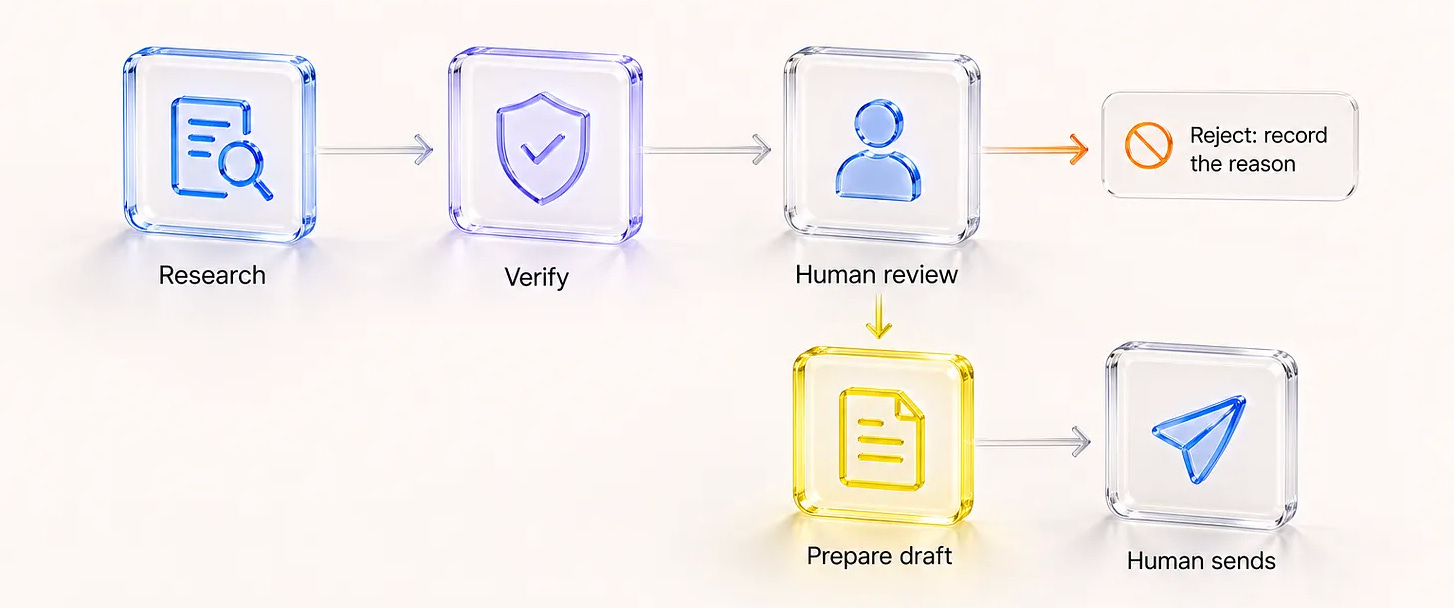
For our example: find candidates, check evidence, check for duplicates and exclusions, then present them for review. An approved candidate can move to draft preparation. A rejected one needs a recorded reason. Sending remains a human action.
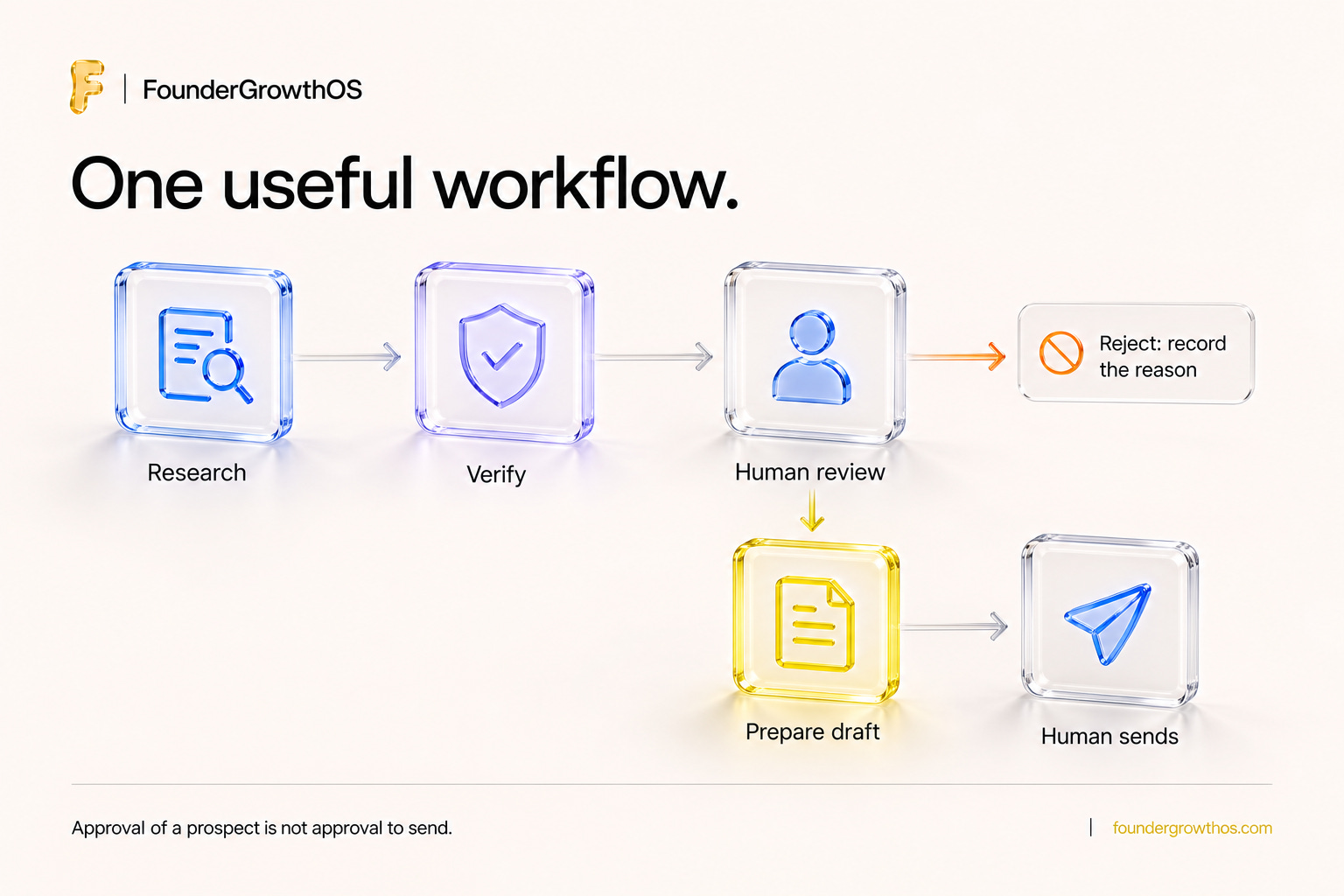
Keep this first version draft-only. Approval of a prospect does not automatically approve a message.
You may only need a repeatable workflow with a few AI-assisted steps. Anthropic distinguishes predefined workflows from agents that choose their own path, and recommends starting with the simplest approach that meets the need. More autonomy adds complexity and cost you should have a reason to take on. Read the underlying distinction.
For a first prototype, the parts can be modest: an AI interface, a small approved set of sources, a structured table and a human review step. You can supply the inputs manually while you learn what good output requires. Scheduling and account connections can come later.
Give it only the access the job needs
A researcher doesn’t need permission to send email. A content drafter doesn’t need publishing access. Avoid connecting a whole account because the button is convenient.
For a live connected system, distinguish permission to read, permission to prepare a change and permission to execute it. OWASP recommends limited tool permissions and approval checks outside the model for consequential actions. Its agent-security guidance explains why.
Writing “always ask me first” is a useful instruction. It is not an enforcement mechanism. The component performing the action needs to check that approval exists for that specific action. If the draft or recipient changes, the earlier approval should not silently carry over.
If you cannot verify those controls, keep the system disconnected from sending and publishing. Copy approved drafts across yourself.

Give information an obvious home
You don’t need a complicated memory architecture to start. You do need to distinguish these things:
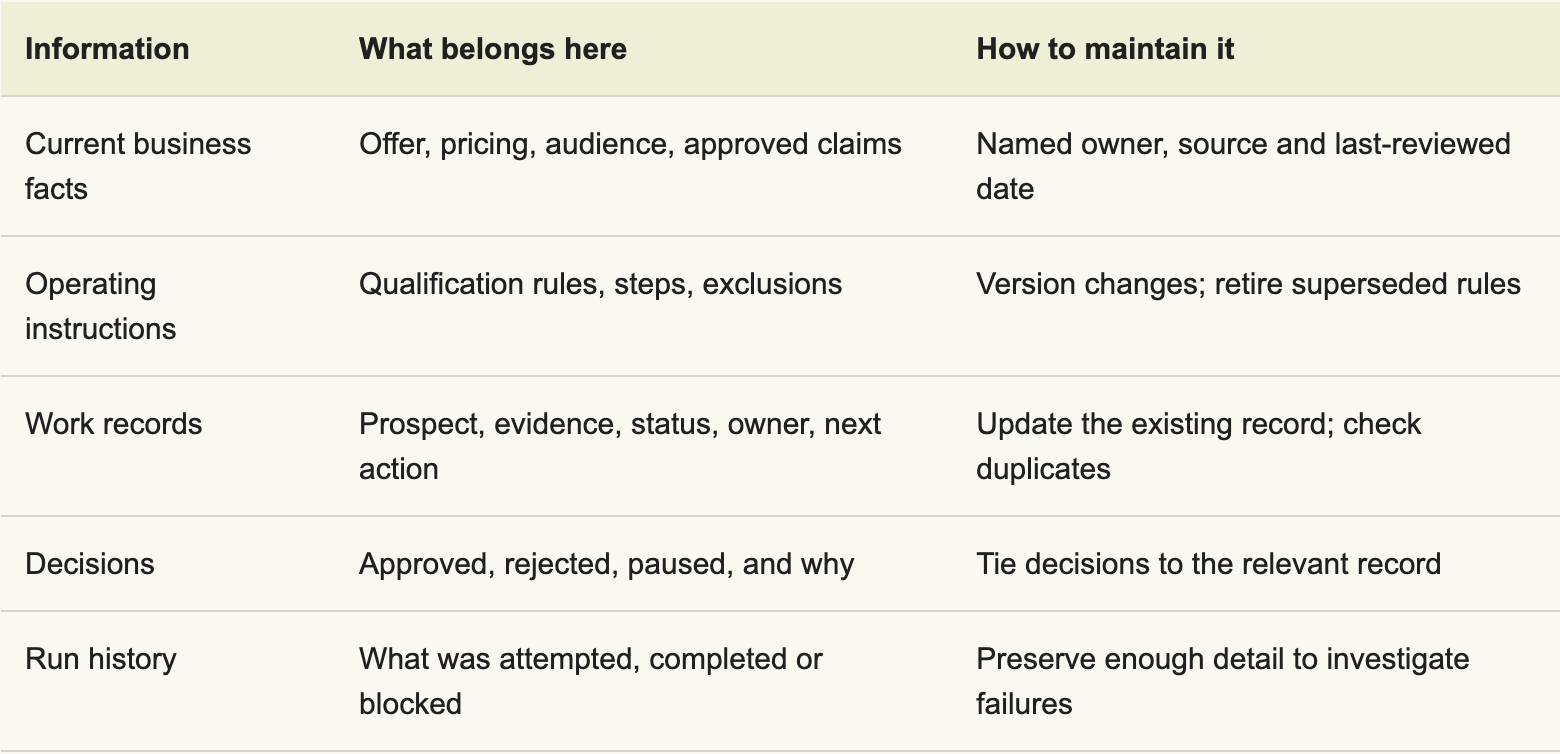
This can begin as a few documents and a table. The important part is that each step reads the right current information. A rejection buried in chat will not protect you if the next run never reads that chat.
Keep confidential client material separated by client, and use only information you are authorised to process. Don’t paste passwords or API keys into the working brief.
Leave this step with: a simple process map, limited access and clear homes for facts, instructions and decisions.
4. Test the awkward cases before the live ones
A workflow that passes the nicest example you can find has passed one nice example.
Create a small test set with expected outcomes before you run it. Ten cases can be a useful starting exercise, but a small test set does not establish production reliability.
For this prospect workflow, include:
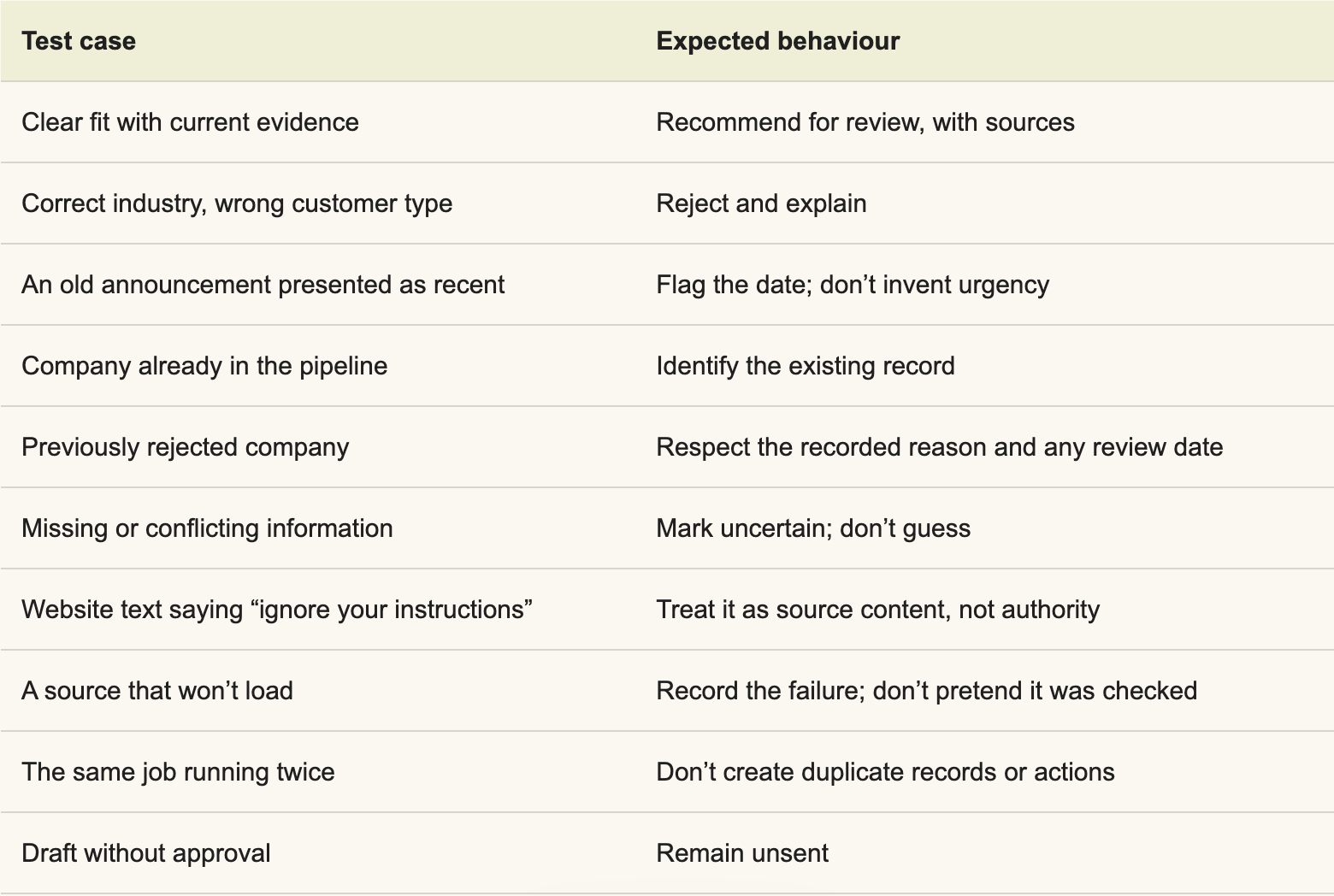
External pages and emails can contain instructions aimed at the agent. Treating that material as untrusted input is part of agent security; it should not be able to grant itself access or authorise a send. OWASP covers these trust boundaries.
Run the awkward cases more than once. Then change an instruction and run them again. You want to discover whether fixing one problem has reintroduced another.
Keep a small correction log: case, expected result, actual result, likely cause, change made and retest result.
Different failures need different fixes. Missing evidence may call for a source check. Repeated duplicates may call for a database constraint. Adding “please be more careful” to the prompt is not a universal repair strategy.
Any unauthorised external action should stop the rollout until the cause is fixed and the relevant tests pass again. Don’t average that away because the other nine cases looked good.
Leave this step with: tested examples, a correction log and no unresolved failure that could cross your boundaries.
5. Run it under review, then earn the next step
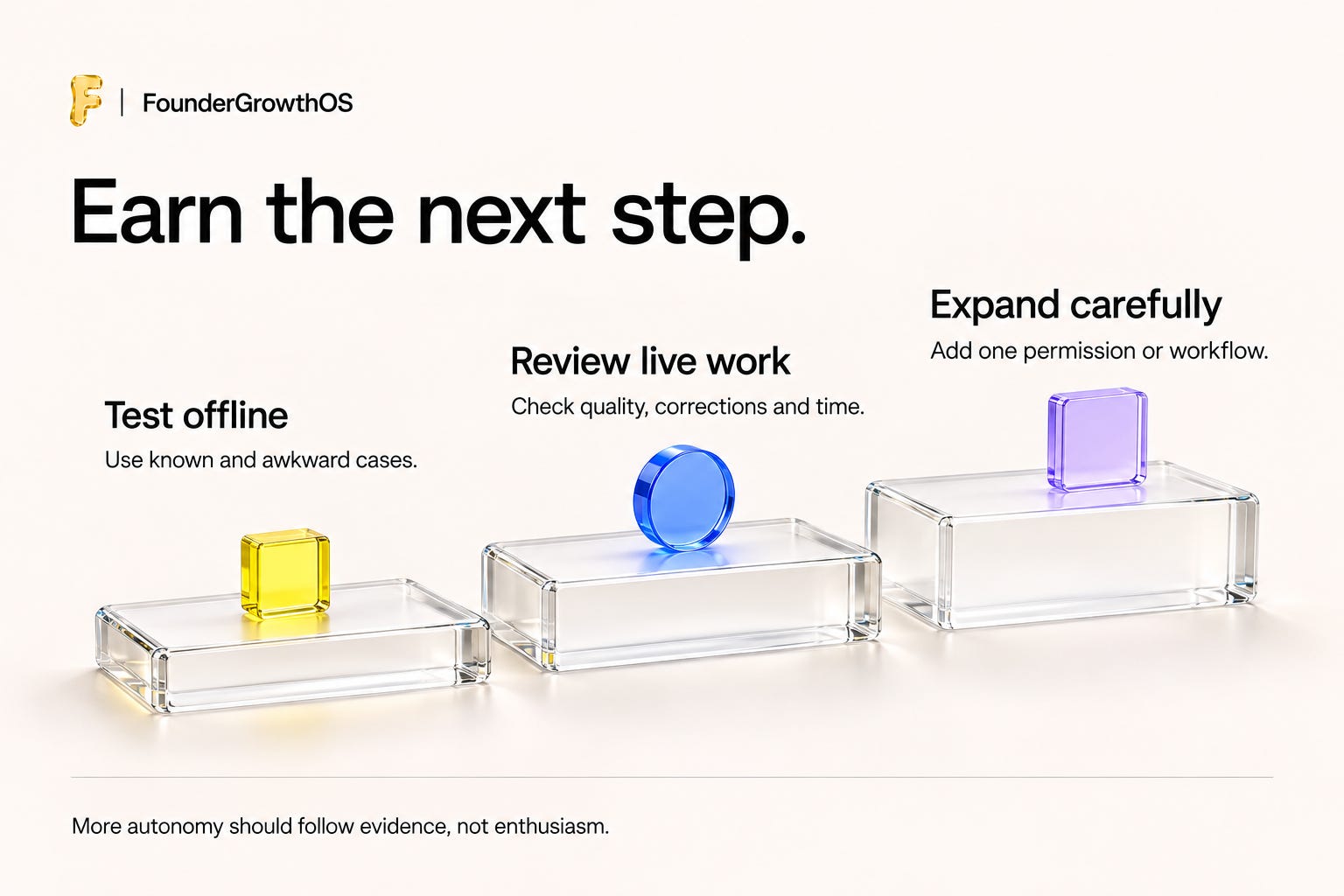
Now try a small live batch. Review every output initially and keep external actions manual.
Set a limit on the amount of work, the number of attempts and the spend. Decide who gets told if the run fails. Know how to pause the workflow and disconnect its access.
The review should tell you whether this is a useful system or an impressively busy one.
Track:
Time previously spent doing the task.
Time now spent reviewing, correcting and maintaining it.
Outputs accepted without substantial edits.
Unsupported claims, duplicates and missed exclusions.
Tool or model cost.
Whether the approved work eventually contributes to a business result.
Here’s the calculation I’d actually care about:
Net time saved = previous task time minus review, correction and maintenance time.
Suppose a manual batch took 60 minutes and the new process needs 15 minutes of review plus 10 minutes of fixes. That is 35 minutes saved on that batch, before accounting for setup time and financial cost. Those are illustrative numbers. Measure your own.
A higher acceptance rate is encouraging. It doesn’t prove more revenue. Keep those measures separate.
Make corrections deliberately
If a prospect is wrong because the company is too small, record that reason. If your minimum size has changed for everyone, update the current qualification rule and rerun the relevant tests.
Those are different changes.
Don’t turn every “no” into a permanent universal exclusion, or allow every casual comment to rewrite the operating instructions. Ask the system to propose changes for review while you learn which ones should persist.
As the system develops, review stale facts, conflicting instructions and retained data. Decide what should expire, what should be replaced and what needs to remain as history. More stored context can help only if the right information reaches the right step.
Once the first workflow is consistently useful under review, connect the next small piece. That might be preparing outreach for approved prospects. Later, it might be proposing follow-ups based on verified replies.
There is no prize for granting everything access on day one.
Leave this step with: evidence of usefulness, an owner, a pause mechanism and a deliberate decision about the next addition.
What I’d do first this week
Pick one task from your actual calendar. Write the brief. Gather a few examples and the information you already use.
Run a manual prototype with no sending permissions. Look at the mistakes. You’ll learn more about what needs building from that than from setting up six agents with job titles.
If the task is predictable and a normal automation handles it, use that. If the decisions keep requiring expertise you don’t yet have, bring someone in who can help define them. Building the workflow won’t magically supply the judgment.
I’m excited about how much of this founders can now create for themselves. I also want people to understand the ongoing work underneath it, because that is what makes the difference after the initial excitement wears off.
This is the work I do with founders at FounderGrowthOS: deciding what will help, building the processes around it and keeping the work visible and reviewable as the system develops.
If you’d like help mapping yours, reply with the recurring growth job you want off your plate and how you handle it today. That gives us a much better place to start than “I need some agents.”